CBT Homework Between Sessions: How to Assign It and Follow It
Most of cognitive behavioral therapy happens between sessions. The session is where a client learns a skill — testing a thought, planning an experiment, facing a feared situation one step at a time — and the week is where they practise it. Homework is not an extra in CBT; it is built into the model.
It is also where therapy most often leaks. A task agreed at the end of a session is easy to forget by Tuesday, a thought record done on the back of an envelope does not come to the next session, and "did you manage the homework?" gets a minute before the conversation moves on. CopingCard's homework is built to close those gaps on both sides: the therapist assigns and follows homework in the provider platform, and the client does it in the app.
Why homework matters
The research on homework in CBT is unusually direct. Kazantzis, Whittington and Dattilio's meta-analysis of 46 studies found that therapy with homework assignments produced larger improvements than the same therapy without them — a pooled effect of d = 0.48 in the controlled comparisons. A later meta-analysis by Kazantzis and colleagues, across 17 studies and 2,312 participants, looked at what clients actually did: both the amount of homework they completed and its quality — how well they practised the skill — were related to outcome, at the end of treatment and at follow-up.
What helps homework get done is just as concrete. Tang and Kreindler, reviewing what a mobile app needs in order to support homework in CBT, named six features: it should be congruent with the therapy, foster learning, guide the therapy, build the connection between client and therapist, put the emphasis on completion, and fit the population it serves. In plain terms: homework should be specific, easy to do at the moment it is needed, visible to both sides, and talked about at the next session.
Assigning homework in the provider platform
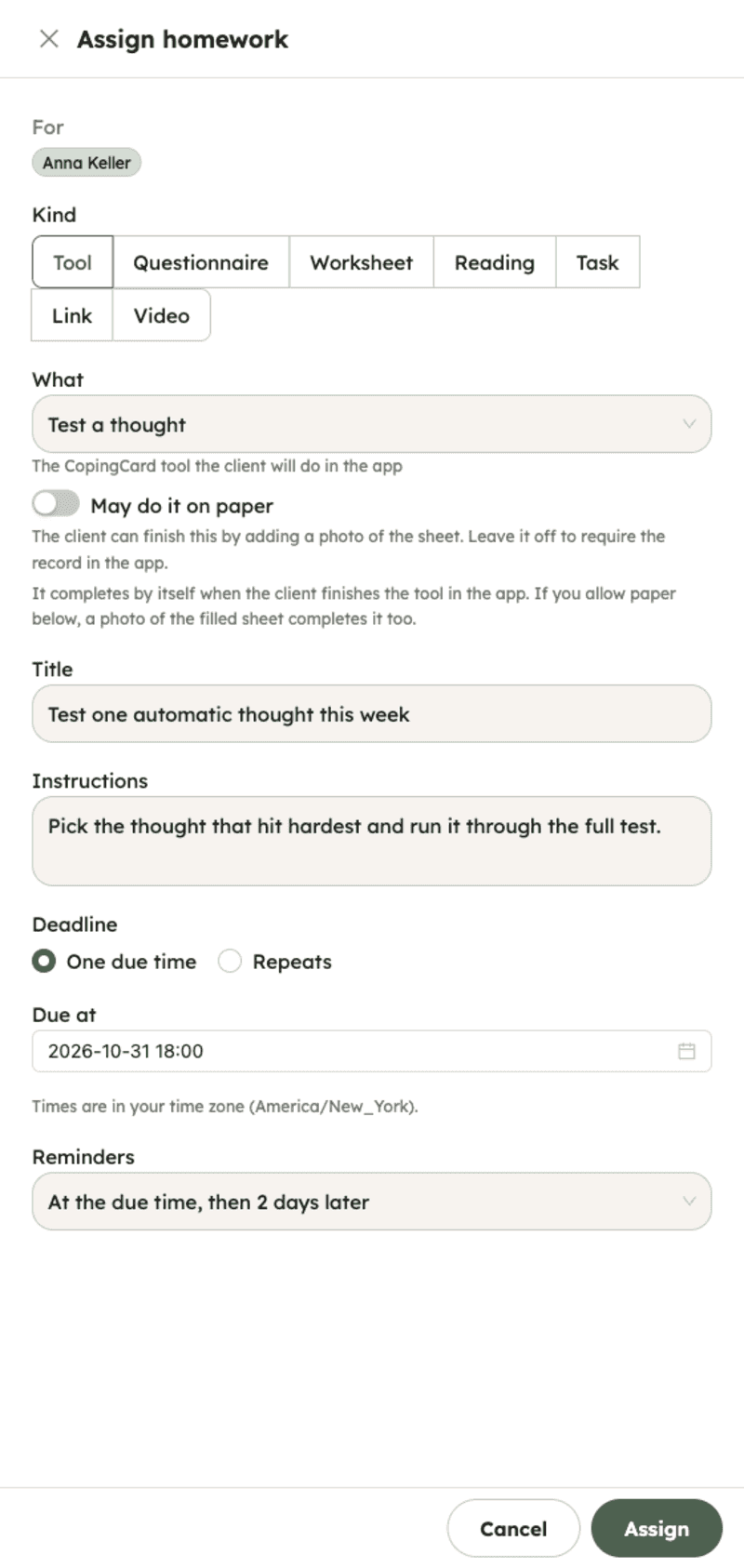
A therapist assigns homework from the client's page or straight from the session form, while the plan for the next week is being agreed.
- Choose what to assign. A CopingCard tool (a thought test, an ABC model, a behavior experiment, an exposure, and the rest of the Toolkit), a questionnaire, a worksheet, a reading, a video, a task, or a link.
- Set when. A due date, or a repeat — every day, every week, every month — for practice that is meant to become a habit.
- The client is told. The assignment arrives in the client's app, with a push notification or an e-mail in their language. Reminders that would land late at night or early in the morning in the client's time zone go out at 20:00 instead (the same evening from 21:00 on, the evening before for the small hours); the due time itself does not change.
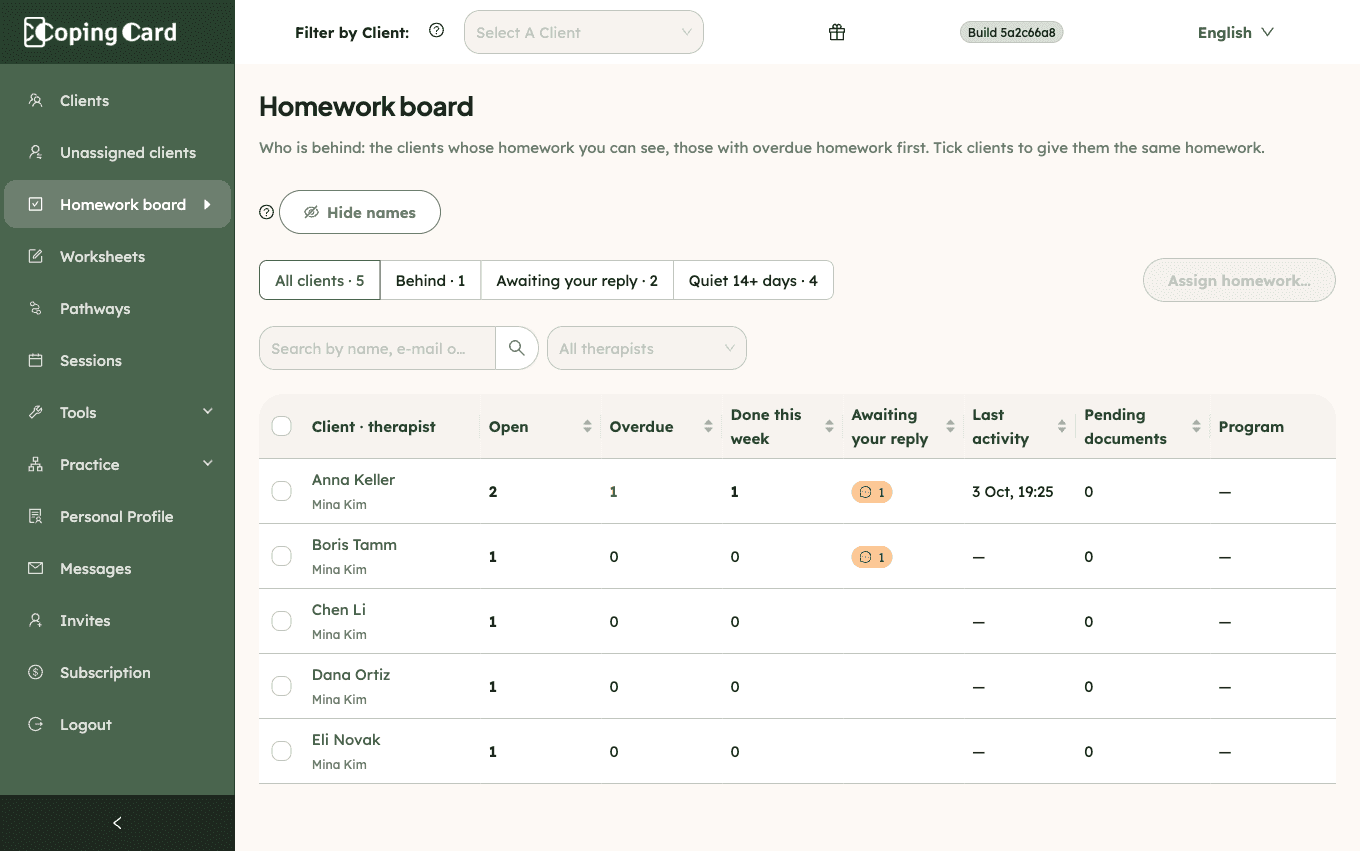
- Assign to several clients at once from the Homework board, one assignment per client.
A tool, a questionnaire, a worksheet or a video completes itself: when the client finishes the thought test, submits the questionnaire or watches the video to the end, the assignment is marked done and points to the record, so what you open is the client's work, not a checkbox. A reading, a task or a link is marked done by the client, with an optional note.
Following homework: the board, the session and the comments
- The Homework board shows, for each of your clients, what is open, what is overdue, what was done this week, what is awaiting your reply, the last homework activity, any pending intake or consent documents, and the program they are on — clients with overdue homework first. Search the board by name, e-mail or id, sort any count, and, as a practice admin, filter by therapist; the header's client filter narrows it to the one client you are about to see.
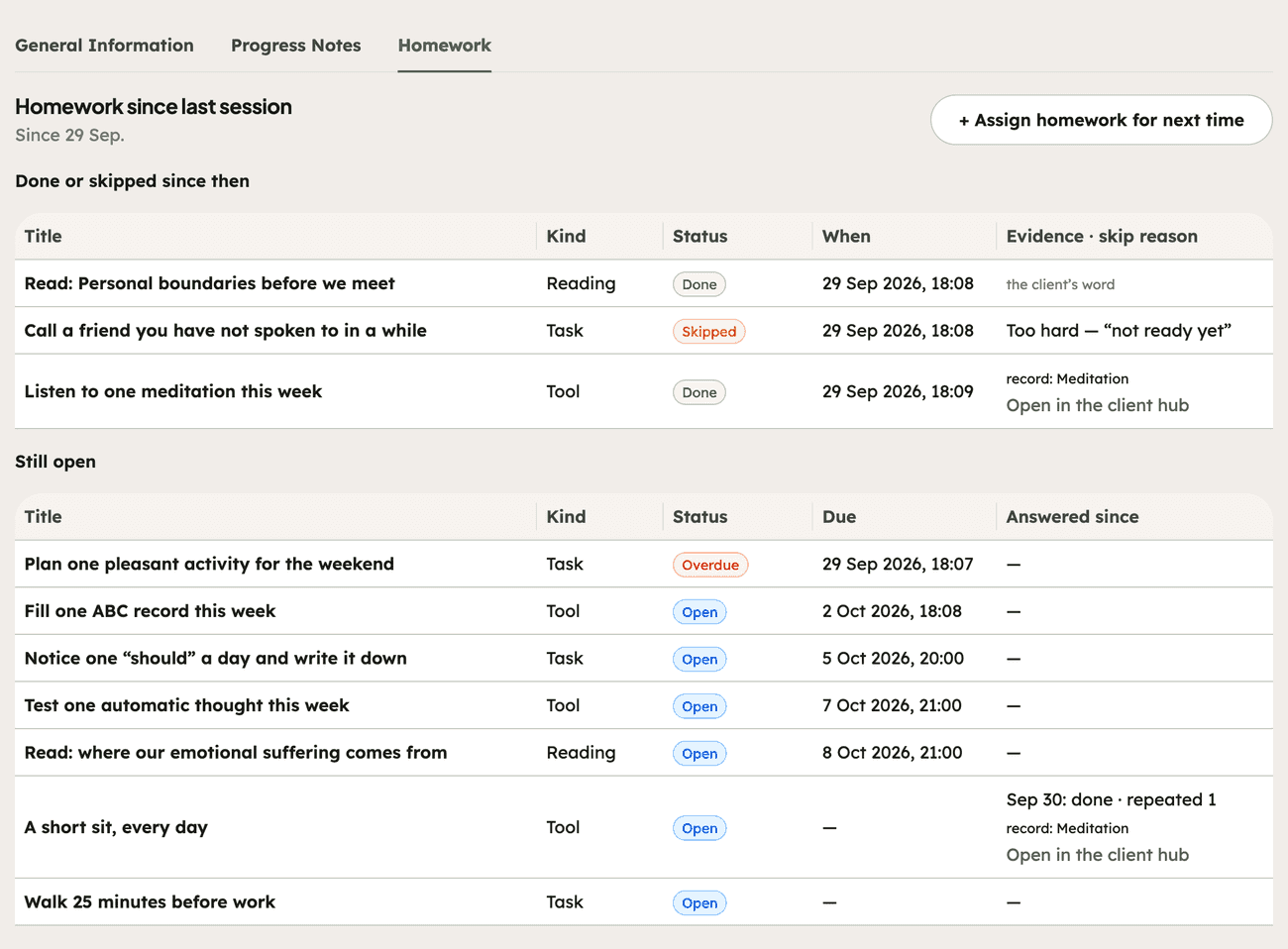
- The session form carries "Homework since last session": what the client did since the previous session, in the order they did it, each item linked to its record.
- Comments sit on every assignment, in both directions. A client can ask a question about a task; the assignment shows "awaiting your reply" on the board and on the client's page, and your answer reaches the client as a notification.
- Send a reminder on any open assignment when a nudge is worth more than a wait.
CopingCard does not watch what clients write as it happens, and it does not e-mail you your clients' homework: you see it when you open the platform. The app says so where clients write — "What you write here is not monitored in real time."
Worksheets, intake and consent
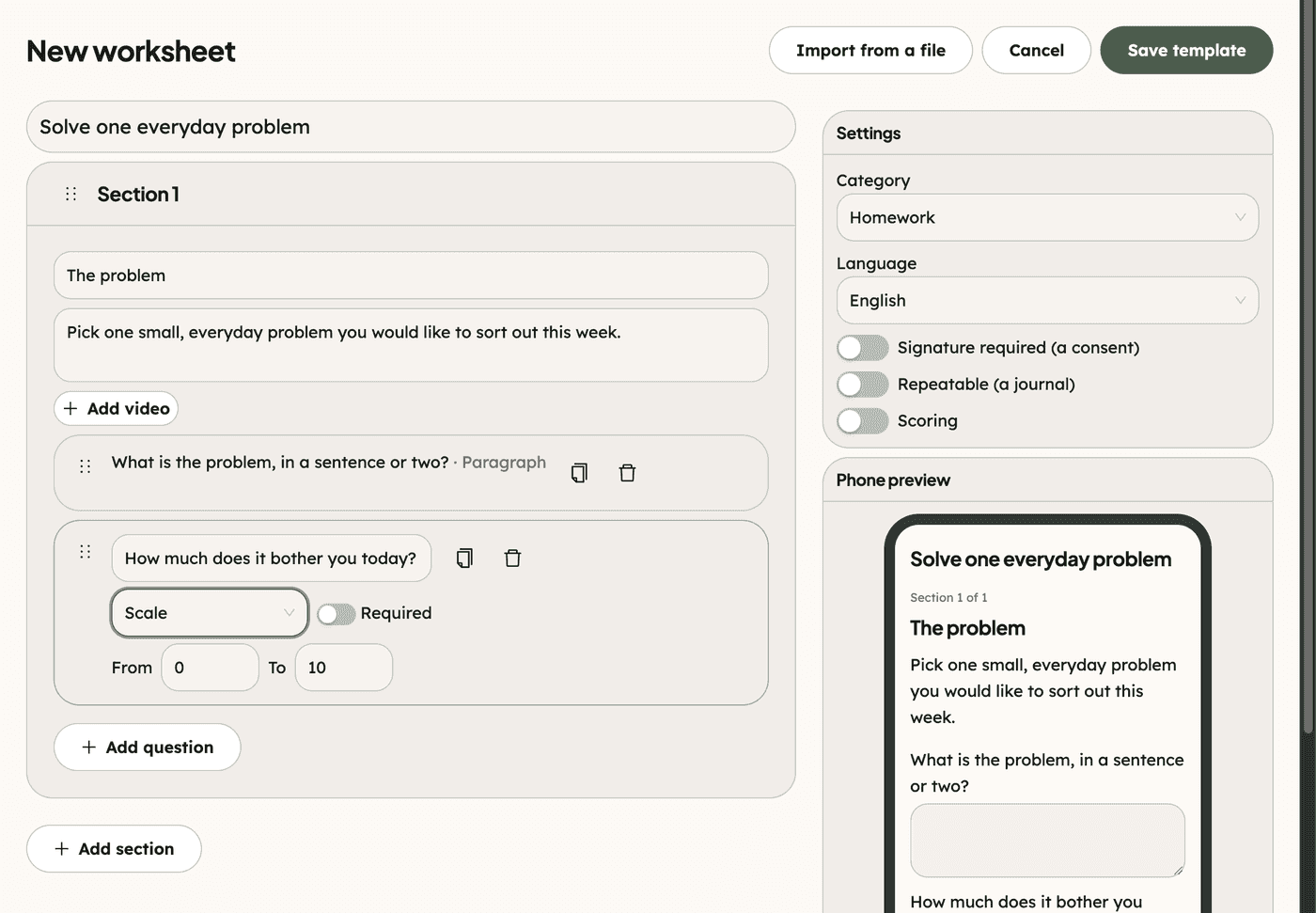
Not every assignment is one of CopingCard's tools. Worksheets cover the rest of a practice's paperwork and handouts.
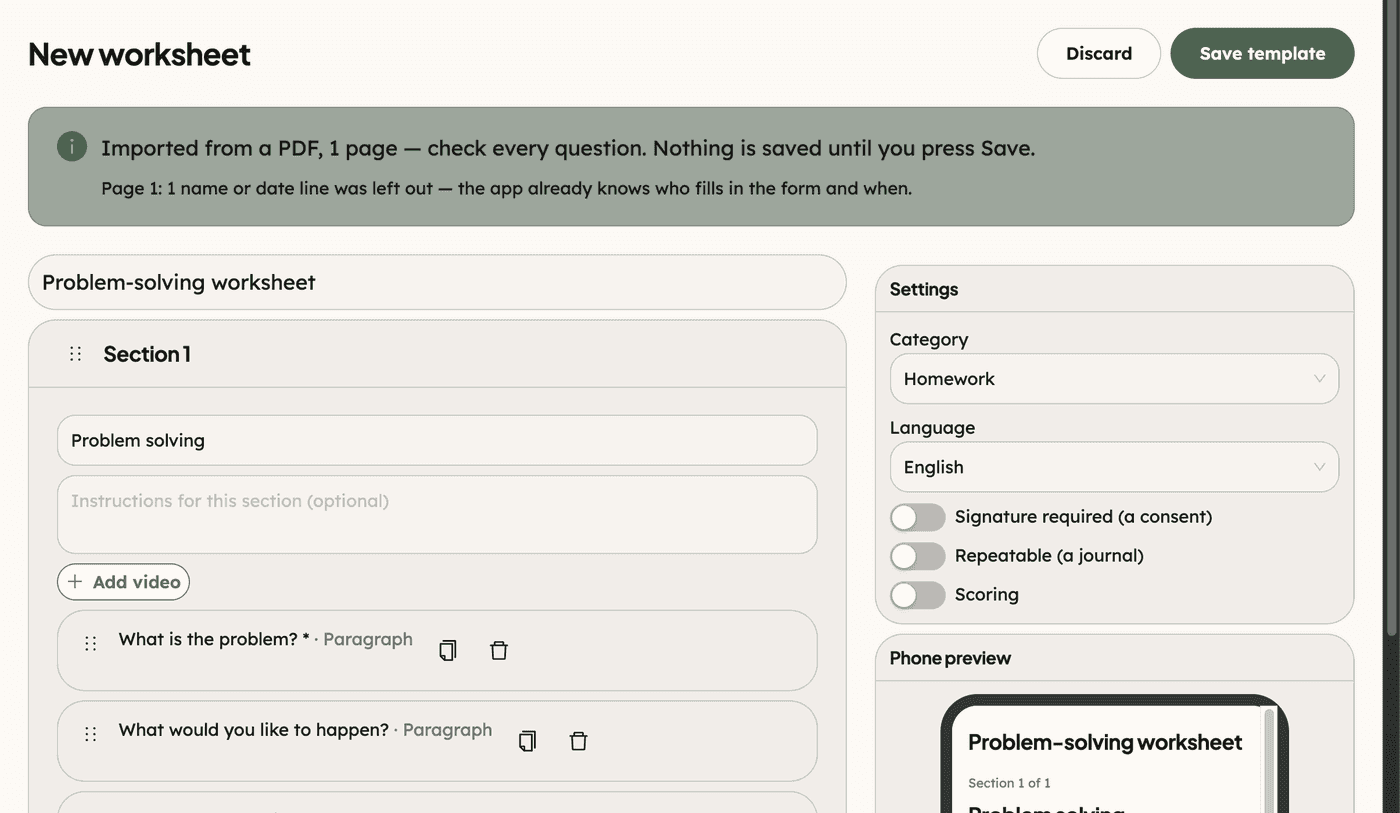
- Build a worksheet from sections of instructions and fields — short and long text, numbers, scales, single and multiple choice, dates and checkboxes — with optional scoring. Switch on a signature to make it a consent document, or make it repeatable to turn it into a journal.
- Start from the CopingCard library — intake forms, consents, and CBT and DBT-skills worksheets in English and Russian — and copy any of them into the practice to adapt.
- Import a paper form. Upload a blank PDF, a Word file or photos of a printed form, and the draft opens in the worksheet editor, ready to check and save. Blank forms only; the file is not kept by CopingCard.
- The client fills it in the app. A consent is signed with a typed full name and "I agree"; the name is stored with the date, the time and the device it was signed from.
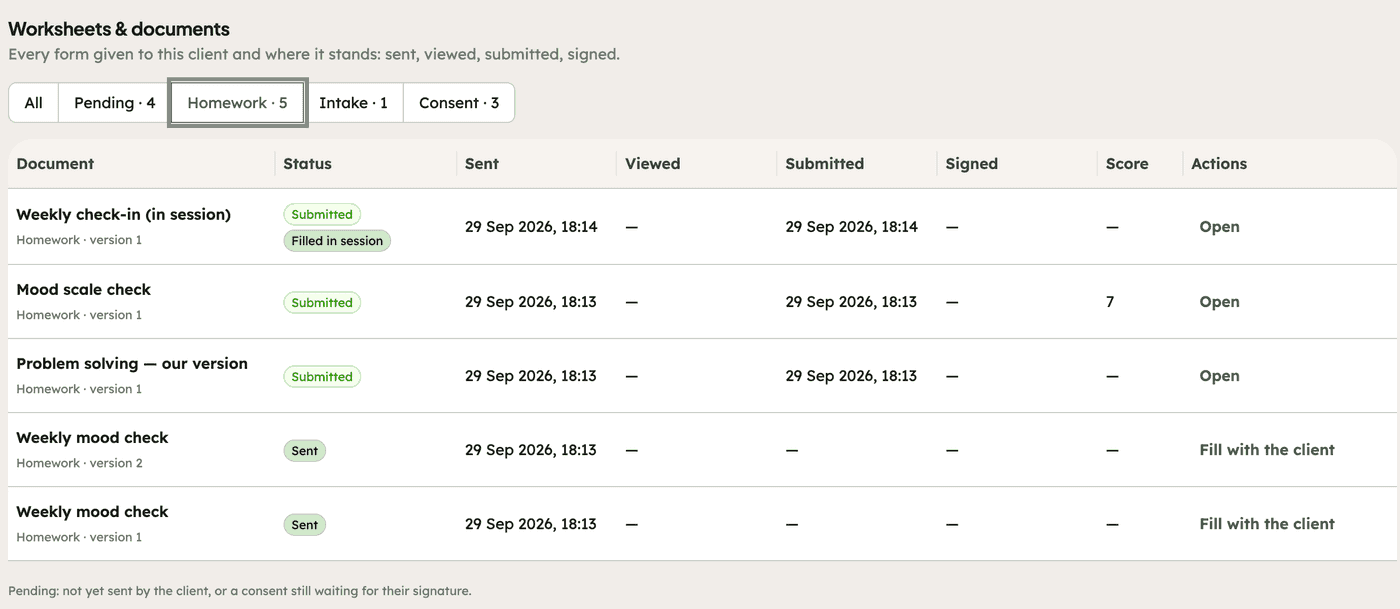
- See where every document stands. The client's Worksheets & documents tab shows each form as sent, viewed, submitted or signed, so "who has not signed the consent yet?" is one look, and the Homework board counts pending documents.
- Print a blank worksheet. A worksheet with something to fill in, no score and no signature has a Print action, in the library and on the client's page, that opens a printable sheet with a blank name line for the browser's print or save as PDF. It never carries the client's name, and the phone has no print.
- Fill it in together. In session, a therapist can fill a worksheet with the client; a consent filled this way still needs the client's own signature in the app.
- Intake packets. Import a whole packet, and "Make an intake packet" turns it into a pathway whose documents all go out at once to each new client you add to it.
Pathways: homework in steps
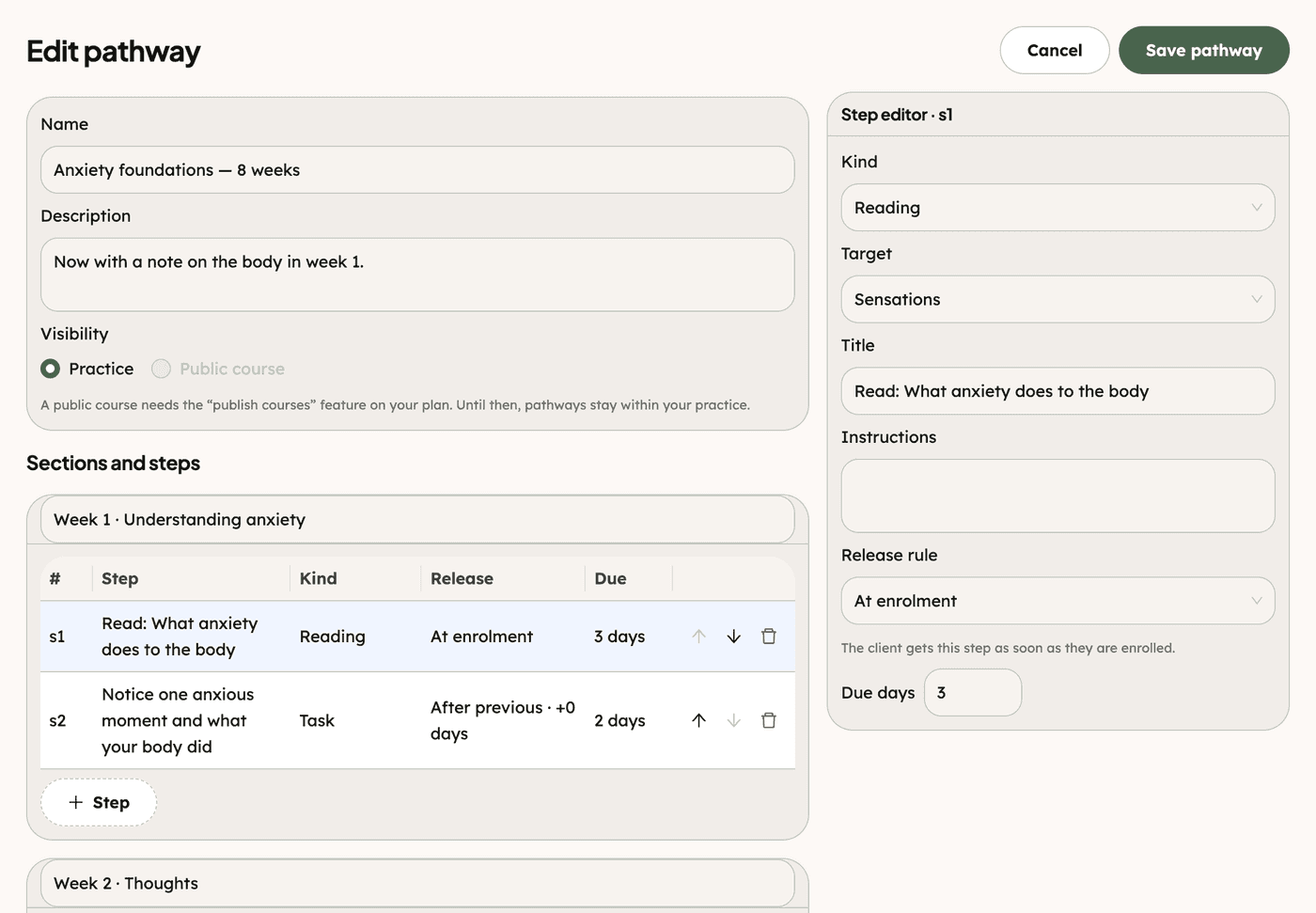
Some work has an order — psychoeducation first, then monitoring, then the first experiment. A pathway is a program of homework steps in sections, and each step opens on its own rule: when the client is added to the pathway, on a set day, after the previous step (with a delay, if you want the client to practise first), or when you release it. Add a client to a pathway, follow their progress step by step, release the next step by hand, or withdraw them; on the client's phone it appears under My programs. A pathway can be duplicated and adapted, and the practice's outcomes page shows, for each pathway, how many clients were added, are still going, completed or withdrew, the completion rate and the median number of days.
Homework in the CopingCard app
For the client, homework lives on the Toolkit.
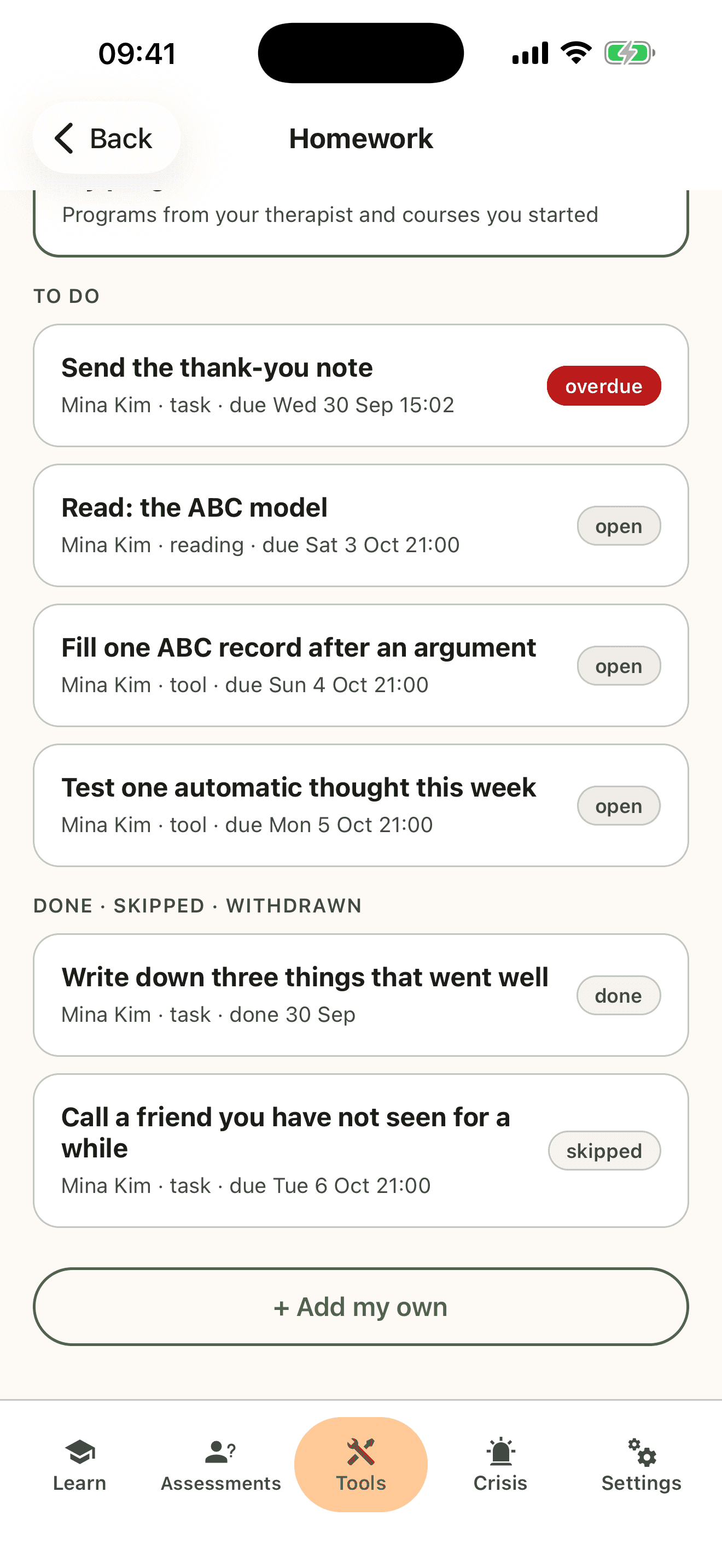
- One list. "Homework" shows what is to do and what is overdue, and a "Next homework" card on the Toolkit home shows the one due soonest.
- Straight into the work. Open takes the client from the assignment into the tool, the questionnaire, the worksheet, the reading, the video or the link.
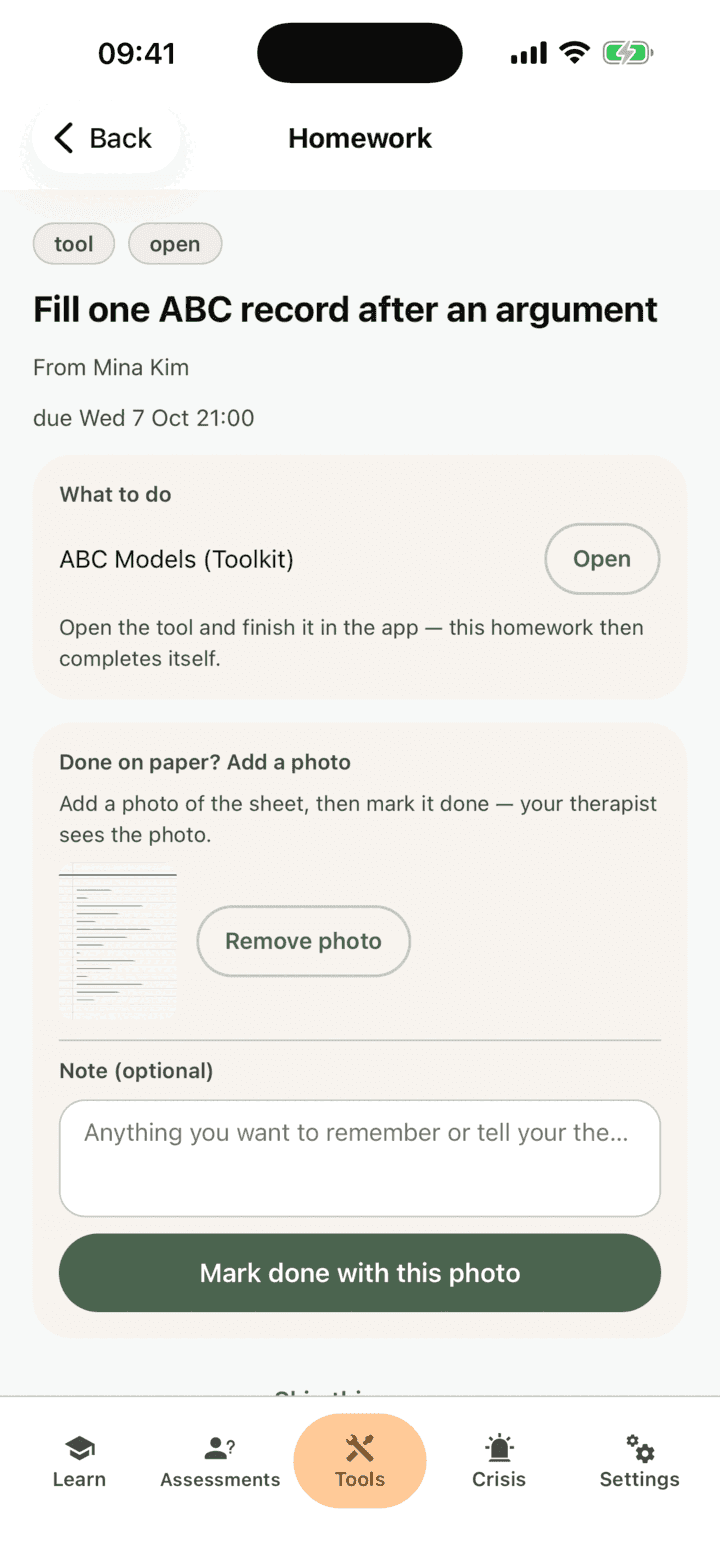
- Done on paper? A task can be marked done with an optional photo. A tool can be done on paper only when the therapist turned on "May do it on paper" for that assignment; a worksheet with something to fill in, no score and no consent can be done on paper too. Either way the client adds a photo of the filled-in sheet and marks it done, and the therapist sees the photo. Scored worksheets, consents, questionnaires, readings, links and videos are completed in the app.
- Skip with a reason — no time, not relevant, too hard, or something else — so a skipped task becomes something to talk about rather than something that quietly disappears.
- Remind me and Add to calendar. A client can set their own reminder for an assignment, or add it to their phone's calendar through the phone's own add-event screen; nothing from their calendar reaches CopingCard.
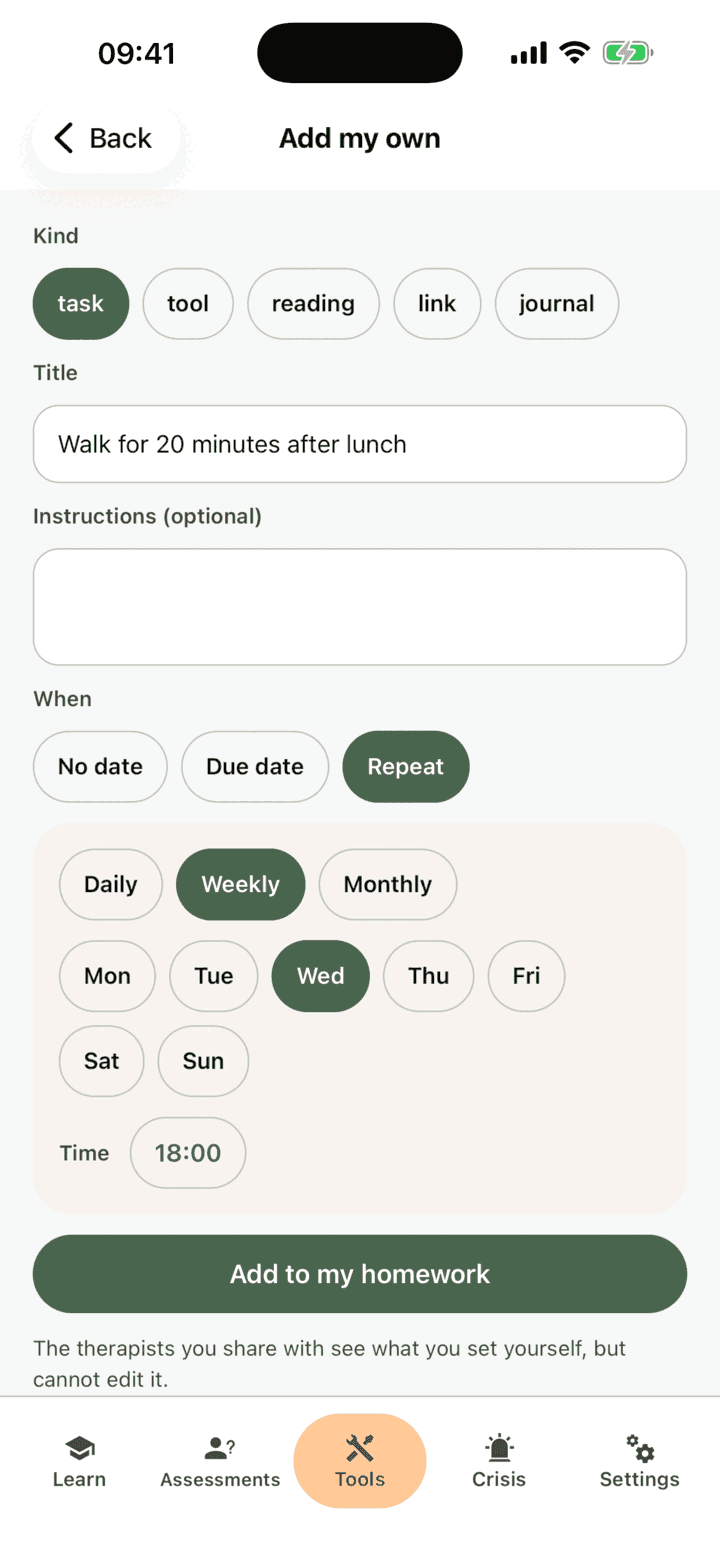
- Add my own. Clients can set themselves homework too, including a journal from the CopingCard library. The therapists they share with see what they set themselves, but cannot edit it.
- Video homework. A video a therapist chose — from YouTube, from Vimeo, or one of CopingCard's own Learn videos — plays inside the app and ticks itself off once it has been watched to the end. CopingCard stores no video.
- My programs. A pathway from the therapist shows its steps and what comes next.
- Comments. A question about a task goes on the task itself, and the therapist's reply arrives as a notification.
How the app and the platform work together
A homework assignment is one record with two sides. The therapist writes it once — in session or after — and it is on the client's phone right away, with its instructions and its deadline. What the client does comes back the same way: a completed thought test, a signed consent, a skipped task with its reason, a question in the comments. The next session starts from what actually happened during the week, not from what either side remembers of it.
Relevant research studies and articles
Kazantzis, N., Whittington, C., & Dattilio, F. (2010). Meta-analysis of homework effects in cognitive and behavioral therapy: A replication and extension. Clinical Psychology: Science and Practice, 17(2), 144–156. Across 46 studies, therapy with homework assignments produced larger improvements than therapy without them, with a pooled effect of d = 0.48 in controlled comparisons of the same therapy with and without homework. Link: https://doi.org/10.1111/j.1468-2850.2010.01204.x
Kazantzis, N., Whittington, C., Zelencich, L., Kyrios, M., Norton, P. J., & Hofmann, S. G. (2016). Quantity and quality of homework compliance: A meta-analysis of relations with outcome in cognitive behavior therapy. Behavior Therapy, 47(5), 755–772. Across 17 studies and 2,312 participants, both the amount of homework clients completed and the quality of their practice were related to outcome, at the end of treatment and at follow-up. Link: https://doi.org/10.1016/j.beth.2016.05.002
Tang, W., & Kreindler, D. (2017). Supporting homework compliance in cognitive behavioural therapy: Essential features of mobile apps. JMIR Mental Health, 4(2), e20. A viewpoint that reviews the research on CBT homework and names six features an app needs to support it: therapy congruency, fostering learning, guiding therapy, connection building, an emphasis on completion, and population specificity. Link: https://doi.org/10.2196/mental.5283
Fry, J. P., & Neff, R. A. (2009). Periodic prompts and reminders in health promotion and health behavior interventions: Systematic review. Journal of Medical Internet Research, 11(2), e16. A systematic review finding that periodic prompts improve health-behaviour outcomes, with the strongest effects for frequent, personalised reminders. Link: https://doi.org/10.2196/jmir.1138
Homework is part of therapy: agree on it with your therapist, and bring what you did to your next session.