

Choose your privacy settings
Privacy Settings has your agreement to the Privacy Policy and Terms, and five optional switches. All the optional switches are off until you turn them on.
Change your privacy settings
Section titled “Change your privacy settings”- In the app, tap the Settings tab, then tap Privacy Settings.
- Under Optional Privacy Settings, tap a switch to turn it on or off. Each one has a line that says what it does:
- Receive Updates Emails: information about products, services, updates, deals or recommendations by e-mail.
- Receive App Updates in-app Notifications: the same information as push notifications.
- Errors Info Collection: info about errors and crashes, to help with fixes and support.
- Application Usage Google Analytics Tracking: which screens you open in the app, collected with Google Analytics, to help improve the app.
- Keep me Signed-In: the app does not sign you out as often.
- Tap Accept and Save Settings.
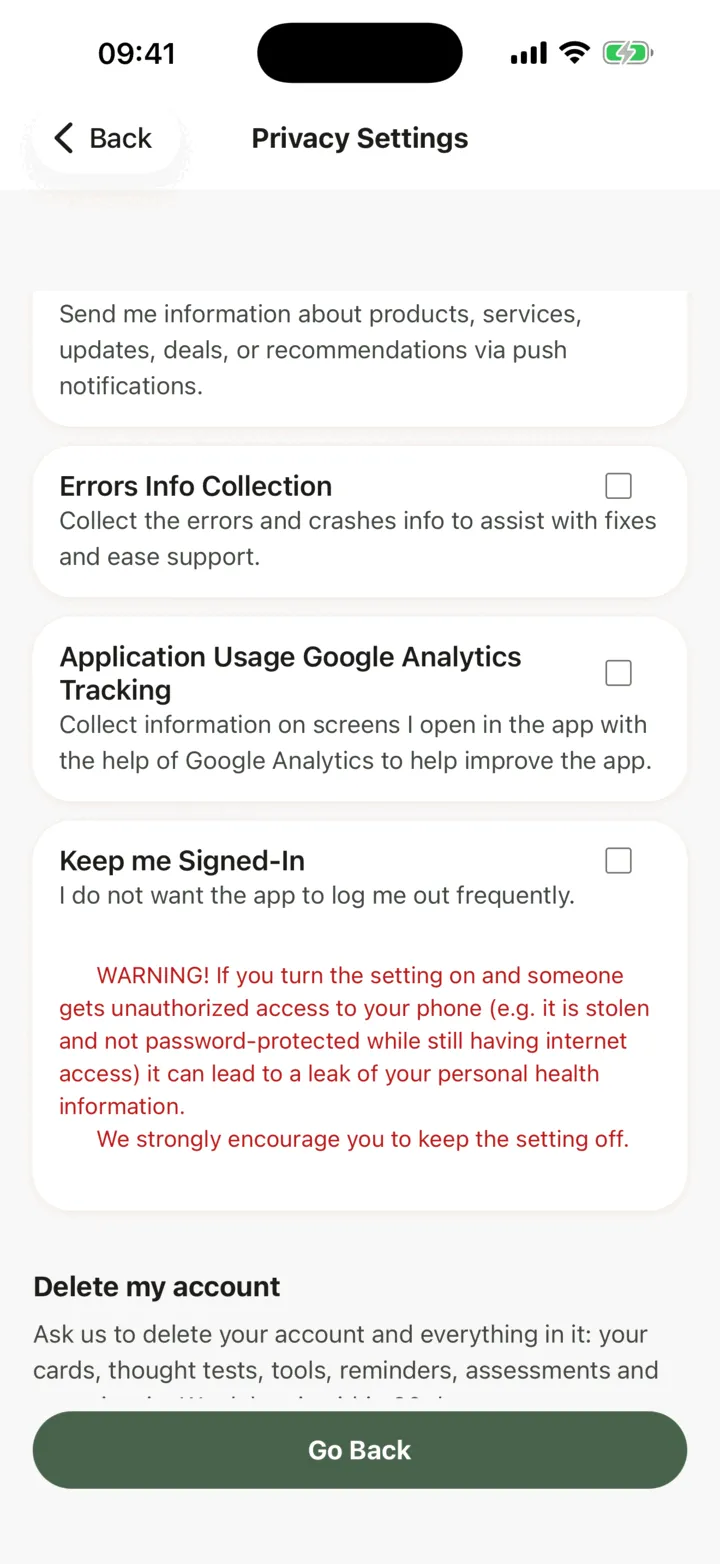
The button works once you have changed something. When nothing has changed, it reads Go Back.
About Keep me Signed-In
Section titled “About Keep me Signed-In”While it is off, the app ends your session once you finish what you are doing. Your work is saved, and you sign in again next time. The app warns that if you turn it on and someone gets into your phone, for example a stolen phone with no password, they could reach your personal health information. The app encourages you to keep it off.
Privacy Policy and Terms
Section titled “Privacy Policy and Terms”The same screen has Privacy Policy and Terms & Conditions. Tap either to read it. You need to keep both accepted to use the app. To delete your account, see Delete your account.