

Follow a program from your therapist
A program is a set of homework steps your therapist puts together, for example over several weeks. Each step reaches you as ordinary homework when its time comes. A program your therapist prescribes costs you nothing: your therapist’s practice covers it.
See your programs
Section titled “See your programs”- On the Homework list, tap My programs at the top.
- Tap a program to see its steps.
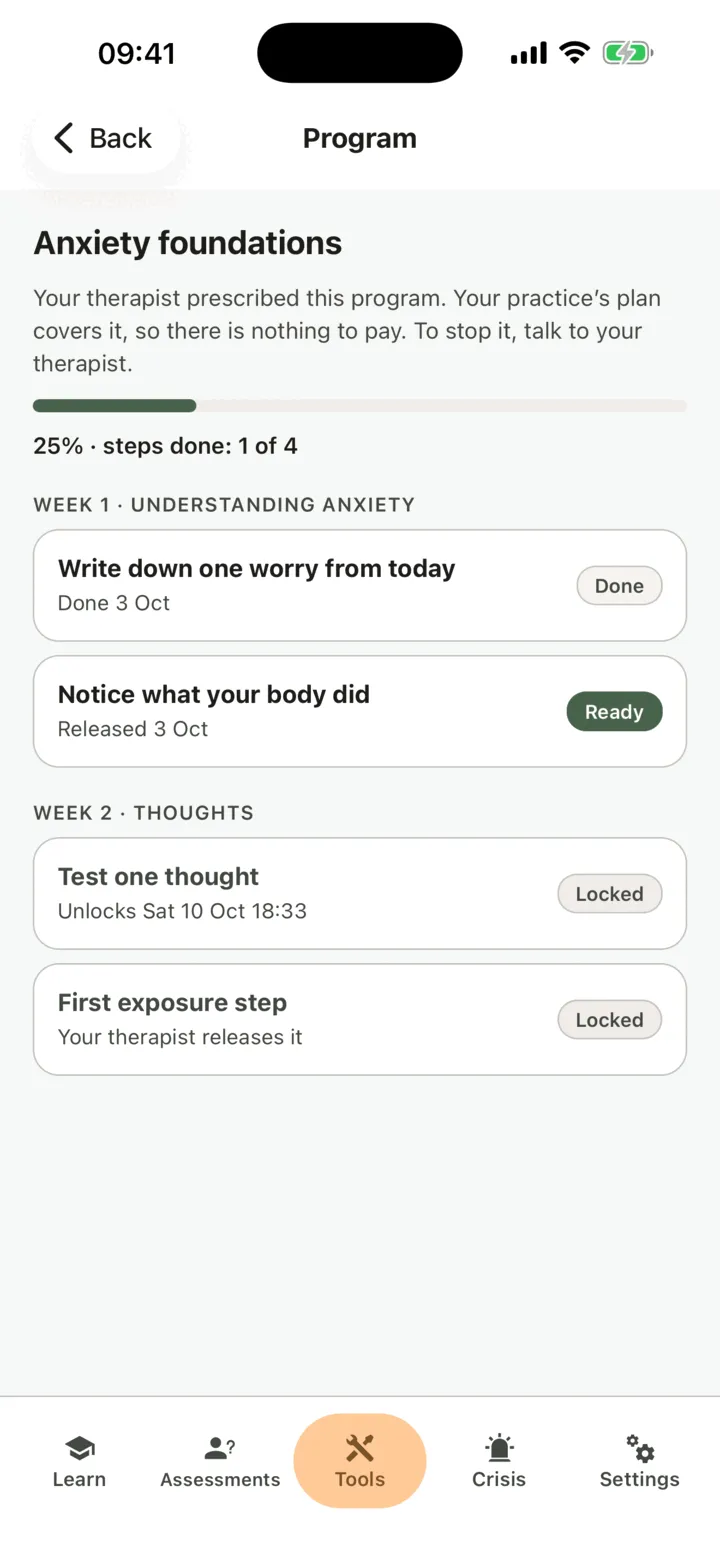
My programs shows each program you are on, who prescribed it, how many steps are done, and what comes next.
On a program, each step shows where it stands:
| Step | What it means |
|---|---|
| Ready | The step is on your Homework list. Tap it to open it. |
| Locked | The step has not reached you yet. It says when it unlocks: on a date, after the step before it, or when your therapist releases it. |
| Done | You finished the step. |
| Skipped | You skipped the step. |
| Withdrawn by your therapist | Your therapist took the step off your list. |
Do a step
Section titled “Do a step”- On the program, tap a step marked Ready.
- Do it like any other homework.
A step you do is marked done on the program too. The next step unlocks by itself when its time comes, usually within a minute, and appears on your Homework list. You also get a notification, as for any homework from your therapist.
When every step has been done or skipped, the program says Completed — well done.
Stop a program
Section titled “Stop a program”You cannot leave a program your therapist started with you from the app. If you want to stop it, talk to your therapist. They can take you off the program: released steps you have not done are marked withdrawn on your Homework list, and what you have done stays in your history.