

Compare ways of living with the Wind rose
The Wind rose is a technique by Dr. Dmitri Dyakov. You describe a way of living, which means what you actually do day to day, and rate it on eight needs. The ratings are drawn as a shape. You lay another way over it, try both on, choose one and plan its first steps. The app credits the technique on its first screen.
For clients
Section titled “For clients”You need the latest version of the CopingCard app, signed in.
Describe the way you live now
Section titled “Describe the way you live now”- Tap the Tools tab at the bottom of the screen, then Values in the list of tools.
- On My values, tap Wind rose.
- Tap Describe the way I live now.
- Give the way a Name, for example “Keep it light”.
- Under What I do (optional), write what you really do in it. Tap Add another for more. A way holds up to ten.
- Tap Save and rate it.
Rate it on the eight needs
Section titled “Rate it on the eight needs”The next screen, The eight needs, asks you to close your eyes and picture living the way you described. Rate it from 1 to 10 on each need. A 1 means this way gives you almost none of that need, and a 10 means plenty. You can add a short example to any need under An example (optional).
| Need |
|---|
| Nurturance and acceptance |
| Empathy and understanding |
| Stability and predictability |
| Safety |
| Competence |
| Autonomy |
| Freedom to express needs and emotions |
| Spontaneity and play |
- Rate all eight needs.
- Tap Draw my rose.
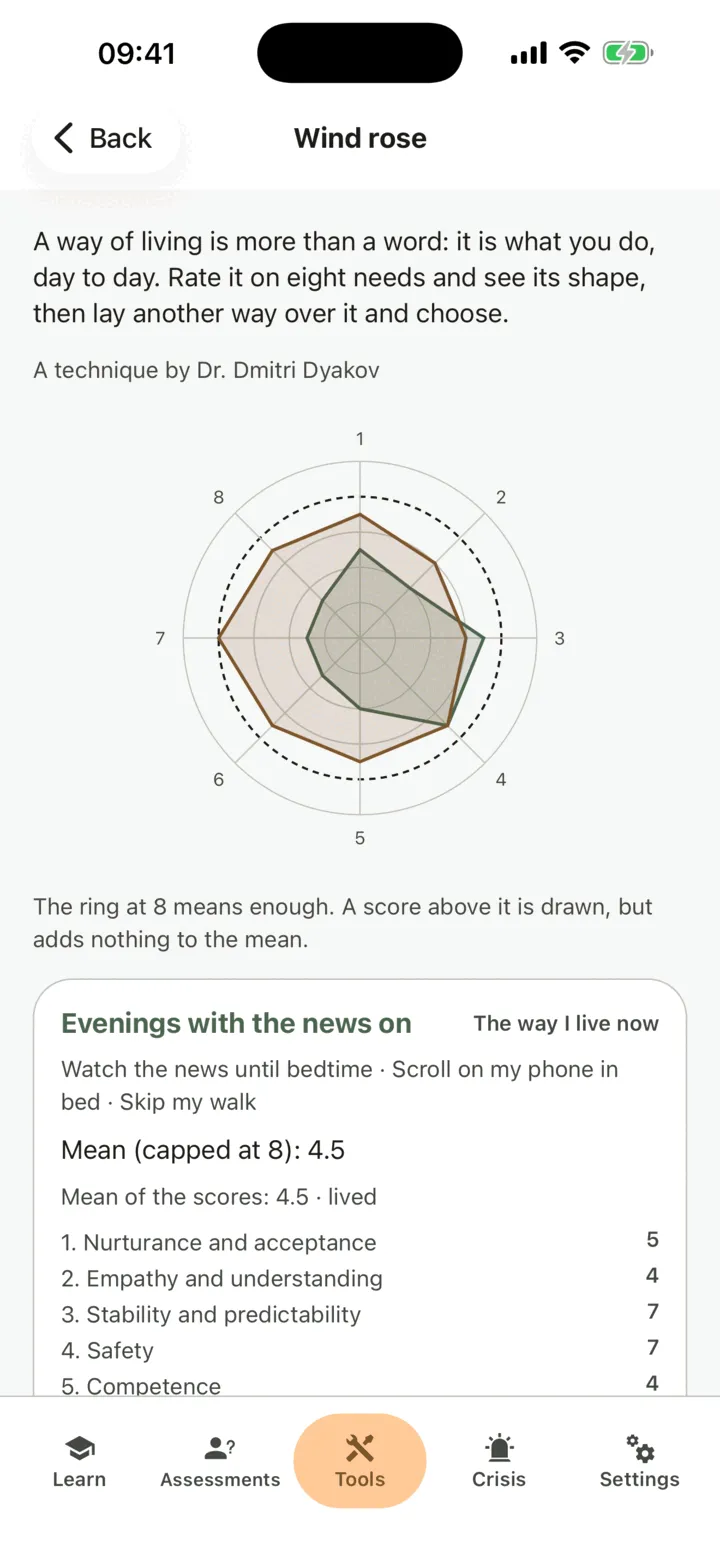
The rose has one ray for each need and a ring at 8, which means enough. A score above the ring is drawn, but adds nothing to the mean. The screen shows Mean (capped at 8) and Mean of the scores. A way you already live is marked lived, and a way you have not lived yet is marked imagined.
Compare it with another way
Section titled “Compare it with another way”- On Wind rose, tap Describe another way.
- Give the way a Name. Under What I would do (at least one), write the things you would do. These should be things you do, not an outcome you hope for.
- If you want, say where the idea came from under Where did the idea come from? (optional), and write Who or what.
- Tap Save and rate it.
- Rate the eight needs the same way and tap Draw my rose.
You have not lived this way yet, so its rating is marked imagined. Both ways are drawn together on the rose. Each way needs a rating before you can choose it.
Try them on and choose
Section titled “Try them on and choose”- On Wind rose, tap Try them on and choose.
- For each way, the app invites you to close your eyes and picture living that way for a week: what you do, who is with you and how your body feels. Stay with it for about a minute. Nothing is saved from this step. Tap Try on the next way to go on. If you prefer, tap Go straight to choosing.
- Tap Choose.
- Pick the way you choose. Write The value it stands for.
- Under Beliefs that hold it up, write a belief in your words. Tap Add another belief for more.
- Under People who share it, write a name. Tap Add another person for more.
- Tap Choose this way.
The chosen way is tagged as chosen, and it appears in your values profile as a value, with its rose line. You can tap Rate my chosen way again later to see how it changes.
Plan it
Section titled “Plan it”- On Wind rose, tap Write my plan.
- Under This week, This month and This year, tap Add a step and write What, With whom and What it needs.
- Tap Save my plan.
Under From your plan, the screen offers ways to start:
- Add to my activities on a step of this week. The app asks how hard it is, from 1 (easiest) to 10 (hardest), then adds it to your activities. See Plan activities with Behavioral Activation.
- Plan the first step and Ask someone to help open the same screens that Behavioral Activation uses.
- Make a coping card turns a belief that holds your way up into a coping card, linked to your value. See Keep and review your coping cards.
Who sees your wind rose
Section titled “Who sees your wind rose”If you are connected with a therapist, they can read your wind rose on your page in their portal when they open it, if you allow them to view your data. The admins of their practice can too if Allow practice admins to view my data is on. They are not alerted when you rate or choose. See Choose what your therapist can see.
For therapists
Section titled “For therapists”A client’s wind rose shows on the Values tab of their page, on its own card, under the credit A technique by Dr. Dmitri Dyakov. You see it if the client lets you view their data, or, as a practice admin, lets practice admins view it.
Read the wind rose
Section titled “Read the wind rose”- In the portal menu, click Clients and open the client’s page: see Find a client and open their page.
- Click the Values tab and find the Wind rose card.
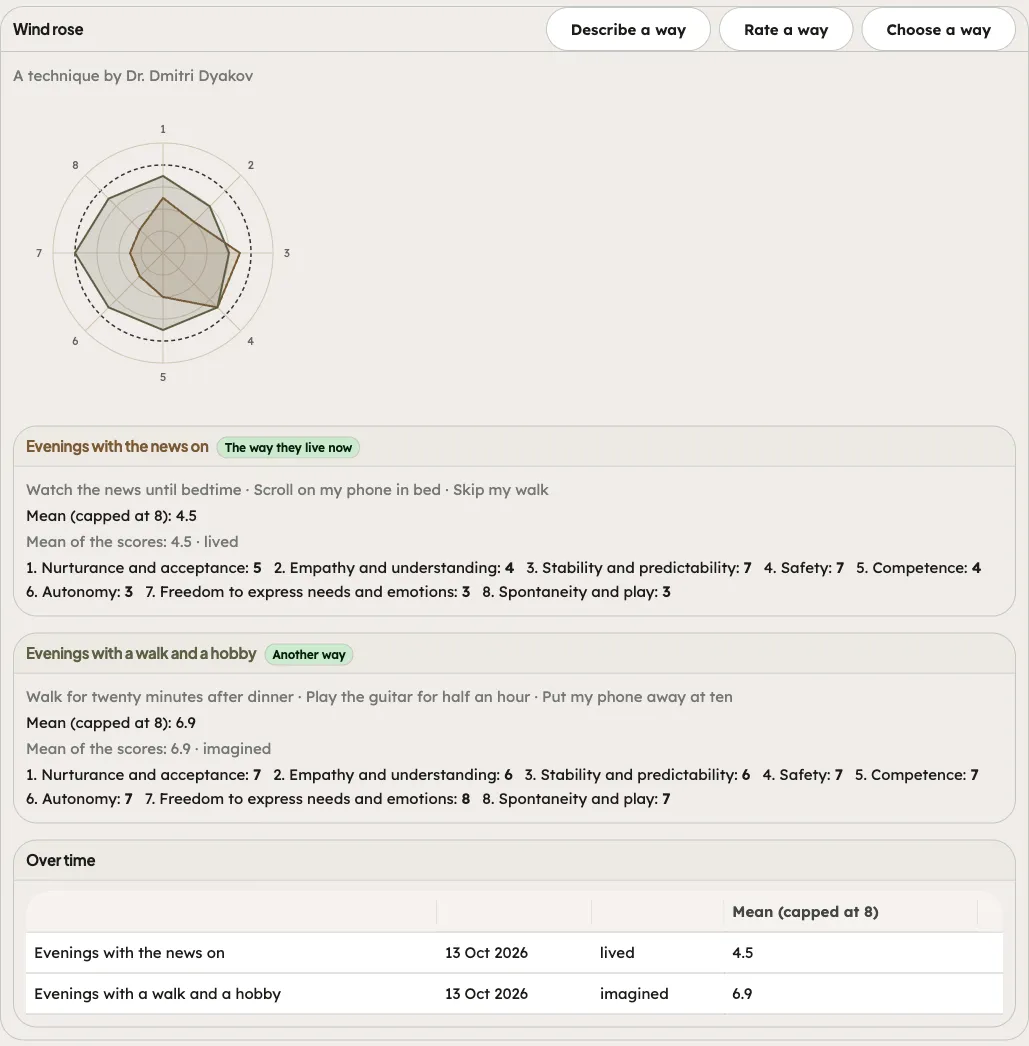
The card draws each way on the rose, with Mean (capped at 8) and Mean of the scores. It tags the first way The way they live now and each other way Another way. For the chosen way it shows Chosen, the Value, the Beliefs that hold it up, the People who share it and Their plan for this week, this month and this year. Over time lists each rating, marked lived or imagined. If the client has not started, the card says so.
Work on it with the client in session
Section titled “Work on it with the client in session”- On the Wind rose card, use Work on it with the client.
- Click Describe a way, Rate a way or Choose a way, and fill in the form: the name and the things they do, the ratings, or the value, beliefs and people.
- Click Save, Save the rating or Save the choice.
What you enter is marked Entered in session. It is part of your practice’s record and does not count as the client’s homework. Saving needs the client to still share something with you. If they share nothing, the portal tells you so and nothing is saved.
Assign it
Section titled “Assign it”- On the Values tab, find Assign a values exercise.
- Under Exercise, choose Wind rose. The default title asks the client to describe the way they live now and rate it on the eight needs.
- Click Assign.
It is marked done by itself when the client chooses a way. See Find what matters to you with Values and Assign homework to a client.