

See a client's worksheets and documents
Every worksheet, intake form and consent a client was given is on the Worksheets & documents tab of their page, with where it stands. To give a client a form, assign it as homework with the kind Worksheet.
See where each form stands
Section titled “See where each form stands”- In the portal menu, click Clients, then open the client’s page with the eye icon in their row.
- Click the Worksheets & documents tab.
- To narrow the list, click Pending, Homework, Intake or Consent. To see everything, click All.
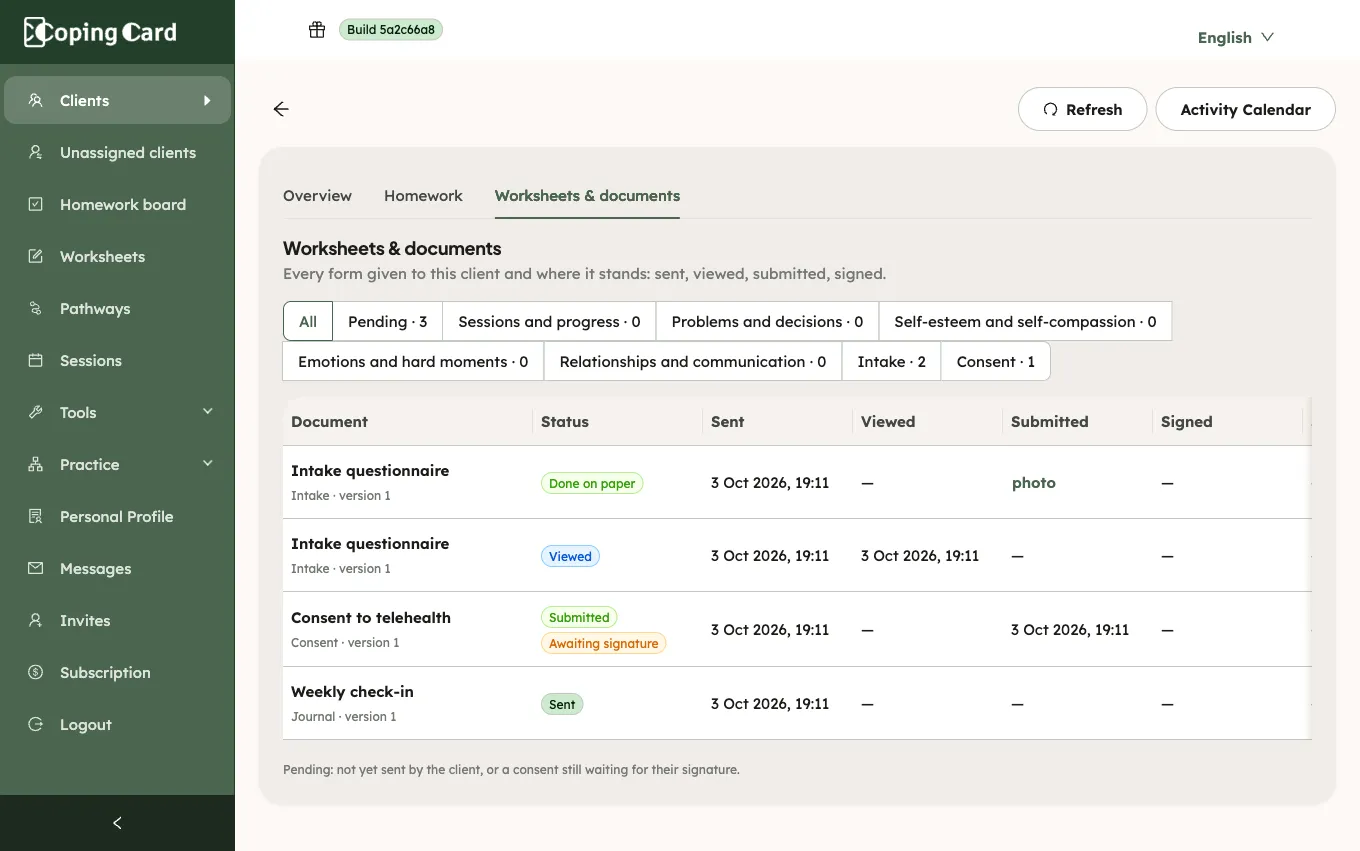
Each row shows the form and its version, its status, and the date of each stage: Sent, Viewed, Submitted and Signed. Pending lists the forms the client has not sent yet, and the consents they sent but have not signed yet. A consent in that state is marked Awaiting signature.
A form the client did on paper and sent a photo of is marked Done on paper, with a link to the photo. See Print a worksheet for a client. A form you filled in together with the client is marked Filled in session. A journal the client added for themselves is listed as read only, with the number of entries.
The row of a repeatable worksheet, such as a weekly journal, also has Over time. It draws the numbers the client has written, entry by entry. See See a client’s worksheet numbers over time.
Open a client’s answers
Section titled “Open a client’s answers”- On the Worksheets & documents tab, click Open in the row of a sent form.
- To print the answers or save them as a PDF, click Print or save as PDF.
- To go back, click Back to the client.
The answers page shows each answer next to its question, who filled in the form, and when. For a worksheet with scoring, it shows the score and the band. For a consent, it shows the name the client signed with and when they signed, or that it still waits for their signature.
Who can see a client’s forms
Section titled “Who can see a client’s forms”The client’s therapist sees them, and so do the practice’s admins when the client allows practice admins to view their data. A form the client has not sent yet shows no answers: answers stay on the client’s phone until they send them. Forms a client sent stay readable to the practice if they later switch off sharing; open their page from the Homework board then.