

Edit your profile and directory listing
Every therapist has a Personal Profile. If you ask to receive referrals and CopingCard approves your profile, it is shown in the app’s therapist directory, where people who are looking for a therapist can read it and send you a message.
Fill in your profile
Section titled “Fill in your profile”- In the portal menu, click Personal Profile.
- Tick I want to receive referrals if you want to be listed in the directory. Approved to get referrals is set by CopingCard, not by you. Point at the question mark next to it to read what an approval needs.
- Choose Accepting Clients and Therapy Formats.
- Enter your First Name, Last Name, Your Mental Health Role, Phone and Years of Practice. Add a Title and a photo with Upload if you like. The photo can be up to 5 MB.
- Write About yourself, add your Education with Add Education, and choose your Languages and Therapy Approaches.
- Under Finances, enter Cost per Session From, To and the Currency. Tick Free Initial Consultation or Sliding Scale if they apply.
- Under Clients, choose the Modality, Age and Issues you work with.
- Click Save.
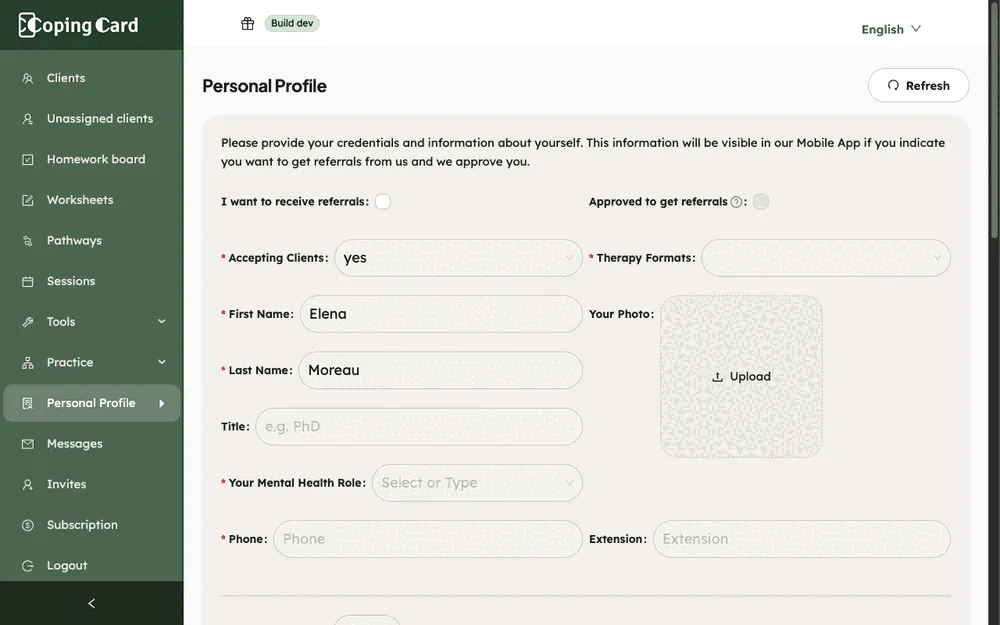
Fields marked with a red star are required.
What happens next
Section titled “What happens next”- Your profile is saved. You can change it whenever you want.
- The directory shows only profiles that CopingCard has approved for referrals. When yours is approved, Approved to get referrals is ticked. Until then your profile is not shown in the directory.
- In the directory, a person can read your details, such as your role, formats, About text, education, approaches, fees and phone number, and can send you a message from your profile. Their messages arrive in Messages: see Read messages from people who found you in the directory.