

Read messages from people who found you in the directory
When your profile is listed in the app’s therapist directory, a person who is looking for a therapist can send you a message from it. The message arrives in the Messages page of the portal. See Edit your profile and directory listing to be listed.
Read a message
Section titled “Read a message”- In the portal menu, click Messages.
- Find the message in the list. Sent At shows when it was sent. Read At stays empty until you open the message.
- Click Read the Message in its row. The text opens in a window.
- Click OK to close the window.
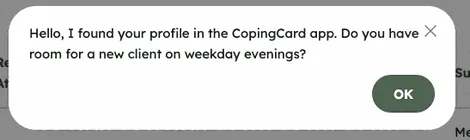
The message is now marked as read, and Read At shows the time.
Reply to the sender
Section titled “Reply to the sender”The From column shows the sender’s name and e-mail address. Click the e-mail address to write to them in your e-mail program. To keep the text of a message somewhere else, click Copy Message in the Actions column.
What happens next
Section titled “What happens next”- When someone sends you a message, CopingCard also sends you an e-mail to say that a message has arrived.
- The Subject is always Message from a Potential Client.
- The message is your own: other therapists of the practice do not see it in their Messages.
- If the sender later deletes their CopingCard account, the message stays in your list and the From column shows Deleted client.