

Skip homework and say why
If you cannot do a piece of homework, skip it and tell your therapist why. Skipping is not deleting: the homework stays in your history, and your therapist sees the skip and your reason.
Skip a piece of homework
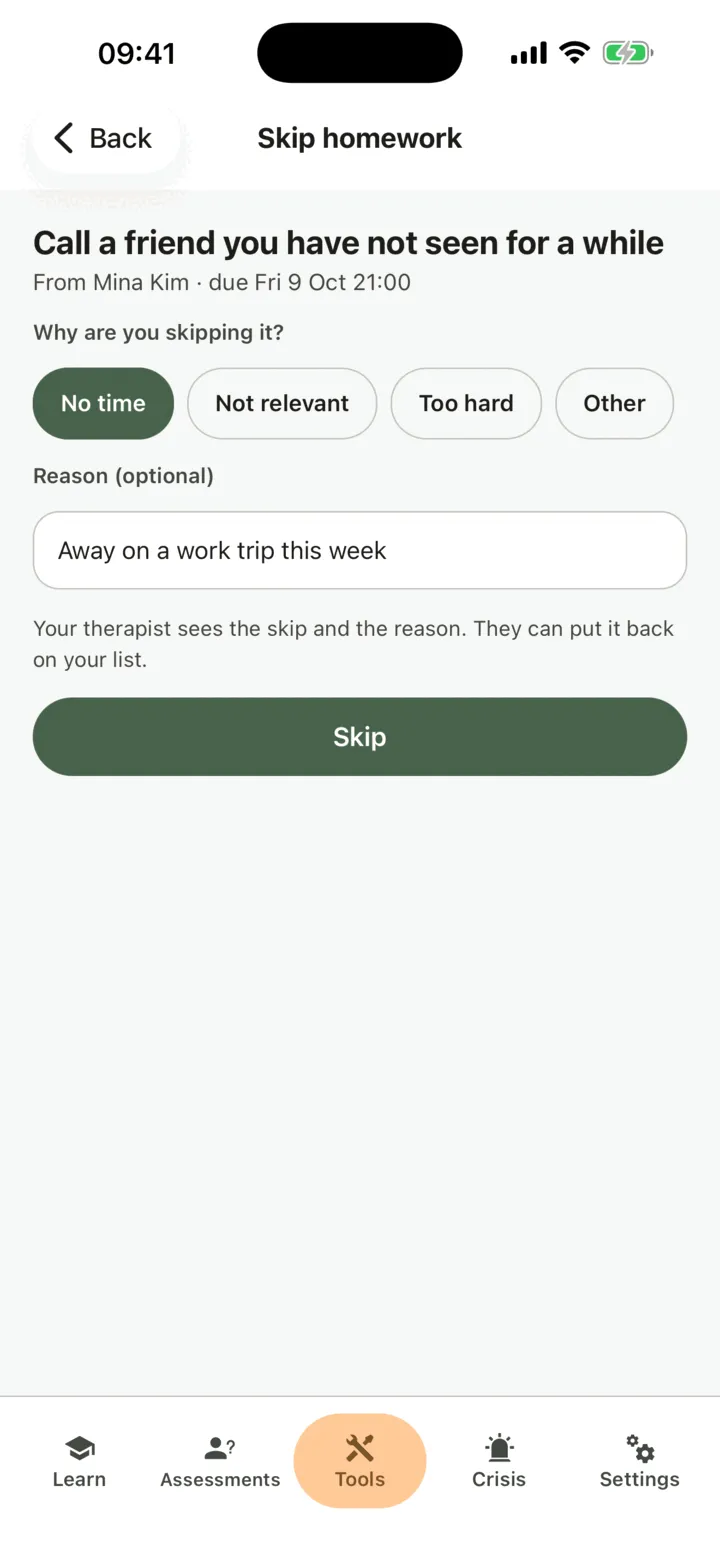
Section titled “Skip a piece of homework”- On the Homework list, tap the homework.
- Tap Skip this one….
- Under Why are you skipping it?, tap a reason: No time, Not relevant, Too hard or Other.
- If you want, add a few words in Reason (optional).
- Tap Skip.
You are back on the homework, and it shows Skipped. Homework that does not repeat moves to Done · skipped · withdrawn on your list, and any reminder you set for it on your phone stops.
Homework that repeats
Section titled “Homework that repeats”For homework that repeats, a skip counts for this time only. The homework stays under To do, and the next one comes as usual.
If you already marked this time done or skipped it, the app says there is nothing more to record for now. If you skipped it and then do it after all, mark it done: that replaces the skip.
What your therapist sees
Section titled “What your therapist sees”For homework from your therapist, they see in CopingCard that you skipped it, your reason and your words, the next time they look at your homework. If you allow practice admins to view your data, the admins of your therapist’s practice see the same. They can put the homework back on your list: it then appears under To do again.