

Set a client's account type
The account type of a client decides which Premium features they have in the CopingCard app. You change it in the client’s row on the Clients list. This does not depend on what your own clients choose to share with you. A practice admin can also change a colleague’s client, when that client allows practice admins to view their data.
Change the account type
Section titled “Change the account type”- In the portal menu, click Clients.
- Click the edit icon in the client’s row. Their name and Account Type become editable.
- Under Account Type, choose Premium via Practice or Free.
- If you chose Free, a warning opens. Read it and click OK.
- Click Save.
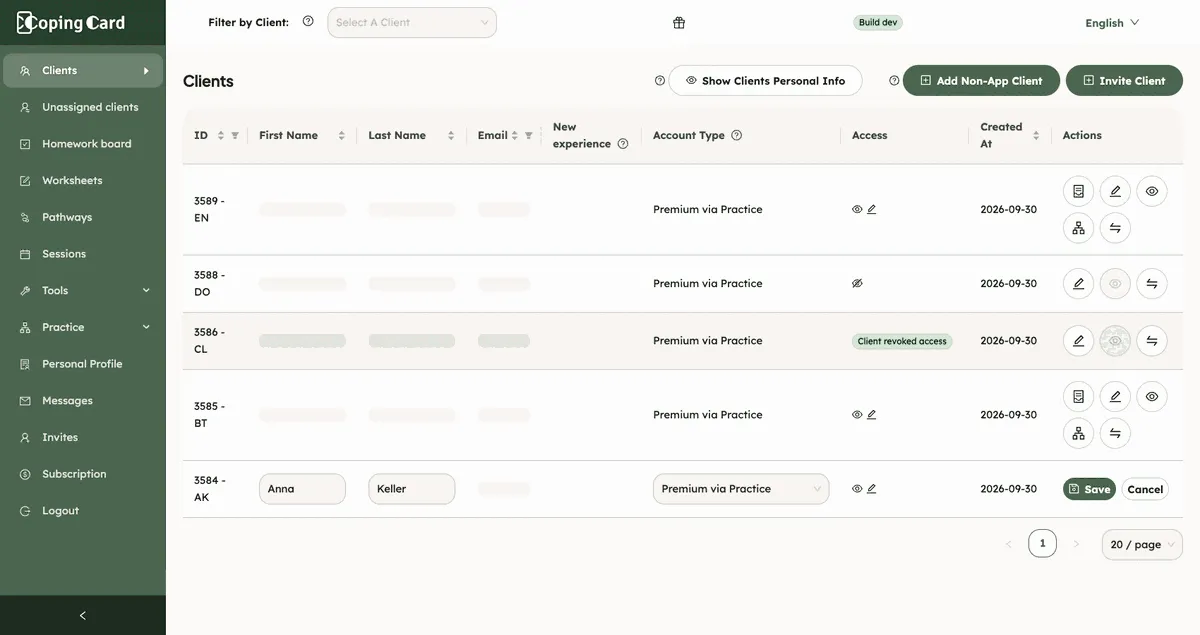
Click Cancel to leave the row as it was. The account type of a client you added without the app is always Non-App Client. You can change their name, but not their type.
What each account type means
Section titled “What each account type means”| Account type | Means |
|---|---|
| Free | The client has limits on the Premium features of the app. |
| Premium | The client has all the Premium features, by paying for them or through another practice. It does not count toward your plan. |
| Premium via Practice | The client has all the Premium features through your practice. It counts toward your practice subscription. |
| Non-App Client | The client does not use the app. It counts toward your practice subscription. |
Moving a client to Free takes the Premium features away from their app account. The warning says this can switch off their reminders and limit how they use the app.
What happens next
Section titled “What happens next”When you give a client Premium via Practice, they get the Premium features in their app. The client counts toward your plan.
If you cannot choose Premium via Practice
Section titled “If you cannot choose Premium via Practice”- If you have reached the number of clients your subscription allows, choosing Premium via Practice shows a warning and nothing changes. Upgrade the plan, or move another client to Free. See Choose a plan and manage billing.
- If your subscription has expired, you see a warning to upgrade it first.
- A practice on the Free plan can give some clients Premium for a limited time. The Free card on Subscription says how many and for how long.