

Sign a consent form in the app
Some worksheets your therapist sends you, such as a consent form, need your signature. You sign in the CopingCard app by typing your full name. The homework is done only after you sign the form.
Send and sign the form
Section titled “Send and sign the form”- On the Homework list, tap the form.
- Tap Open.
- Read the form and answer its questions.
- On the last section, tap Submit.
- Under Sign to finish, type your name in Your full name.
- Tick I agree.
- Tap Sign.
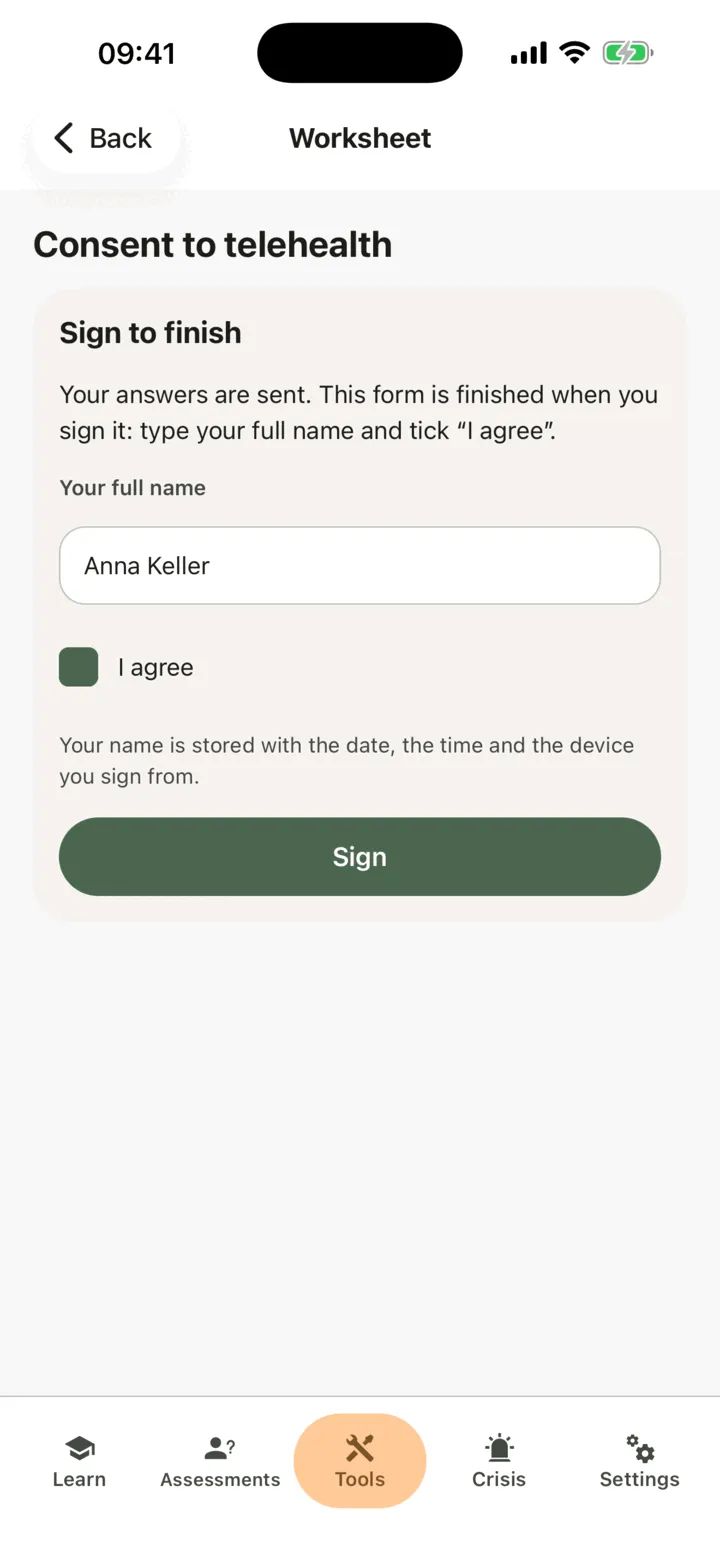
The form shows the date you sent and signed it, and a moment later the homework shows done.
If you leave after sending the form but before signing, the homework stays open. Open the form again to sign it. If you forget to type your name or tick I agree, the app tells you what is missing.
What is stored with your signature
Section titled “What is stored with your signature”With your signature, CopingCard stores the name you typed, that you agreed, the date and time you signed, your internet (IP) address, and the app version and phone system you signed from (for example CopingCard 1.5.0 on an iPhone, with its iOS version).
Your therapist sees your answers, the name you signed with and when you signed. If you allow practice admins to view your data, the admins of your therapist’s practice see the same. The signed form, with what is stored with your signature, stays in your therapist’s record even if you later switch off sharing or delete your CopingCard account. Only you can sign the form, in your own app. If your therapist filled in the form with you in a session, it still needs your own signature in the app.